Run the service desk. Prove the compliance. Let the AI do the rest.
One portal for the work your clients pay for and the evidence their auditors ask for. Tickets, changes, time and invoicing on one side; ISO 27001 and NIST evidence gathered straight from their tenants on the other. Every AI action logged, every change approved first.
Reads your clients’ Entra, Intune and Microsoft Secure Score and turns what it finds into evidence against ISO 27001:2022 and NIST CSF 2.0. One collection answers both frameworks through a crosswalk, so the work is done once.
Statement of Applicability with a recorded reason for every exclusion
A control nobody could check reads “not checked”, never “passed”
Every finding keeps the raw response it came from
02
Hold a client to their own policy
Upload the policies a client already has. The portal reads what each one commits to and checks it against what their systems actually do — then reports the gaps in their own words.
“Your access policy requires MFA for all administrators” beats “Annex A asks for MFA”
A promise nothing can verify is recorded as stated, never as met
Which controls each document genuinely governs, scored honestly
03
Changes that cannot skip approval
ITIL change classification on the ticket, enforced on the server. The portal can apply a fix to a client tenant — but only one that was approved, and only after recording what the setting was before it touched anything.
Microsoft Secure Score recommendations become drafted change records
The previous value is written to the audit trail before the change is made
Nothing is applied by a background job, ever
04
AI that leaves a trail
Drafts replies, plans changes, works in Microsoft 365 under supervision. Every action is logged with the hours and the API cost it used, against the ticket it was working.
Billable at your normal rate, with the rounding shown on the entry
Runs on your own hardware in local mode if you want it to
Told what is already wrong in a tenant before it proposes anything
What makes it trustworthy
Compliance software is easy to write and hard to believe. These are the properties that decide whether a report means anything.
Checked and failed is not the same as never checked
A missing permission shows as “not checked”, in a different colour from a gap. A source that stopped working can never leave a stale pass on screen.
The audit trail cannot be edited
Every event is hash-chained to the one before it. Delete something and the chain says so — including when the deletion was ours.
Proportionate to the company
Four compliance brackets, from startup to listing-ready. A five-person team is not held to the controls of a thousand-person one, and every deferral is recorded with what brings it back.
Read-only until you say otherwise
Integrations pull. The one thing that writes to a client tenant needs an approved change, an administrator, and a recorded before-state.
Everything in one place
The parts of an MSP that usually live in four systems and a spreadsheet.
Service desk
Tickets with the email thread attached, over Microsoft Graph
A support mailbox per client
Inbound attachments and inline screenshots kept with the message
ITIL change classification and approval boards
Compliance
ISO 27001:2022 and NIST CSF 2.0, crosswalked
Evidence from Entra, Intune, NinjaOne and your own records
Microsoft Secure Score tracked over time
Scheduled collection, so posture stays current on its own
Time and billing
Time capture with a replayable recording behind the hours
Invoices generated from logged work
AI time and cost recorded separately from human hours
Per-client rates and out-of-hours multipliers
Automation
Reply drafting and change-record drafting
A supervised Microsoft 365 agent with per-action approval
Endpoint data from NinjaOne and Intune on the ticket
Local AI mode for clients whose content must not leave the building
Product tour
See Timetrackr on real tickets
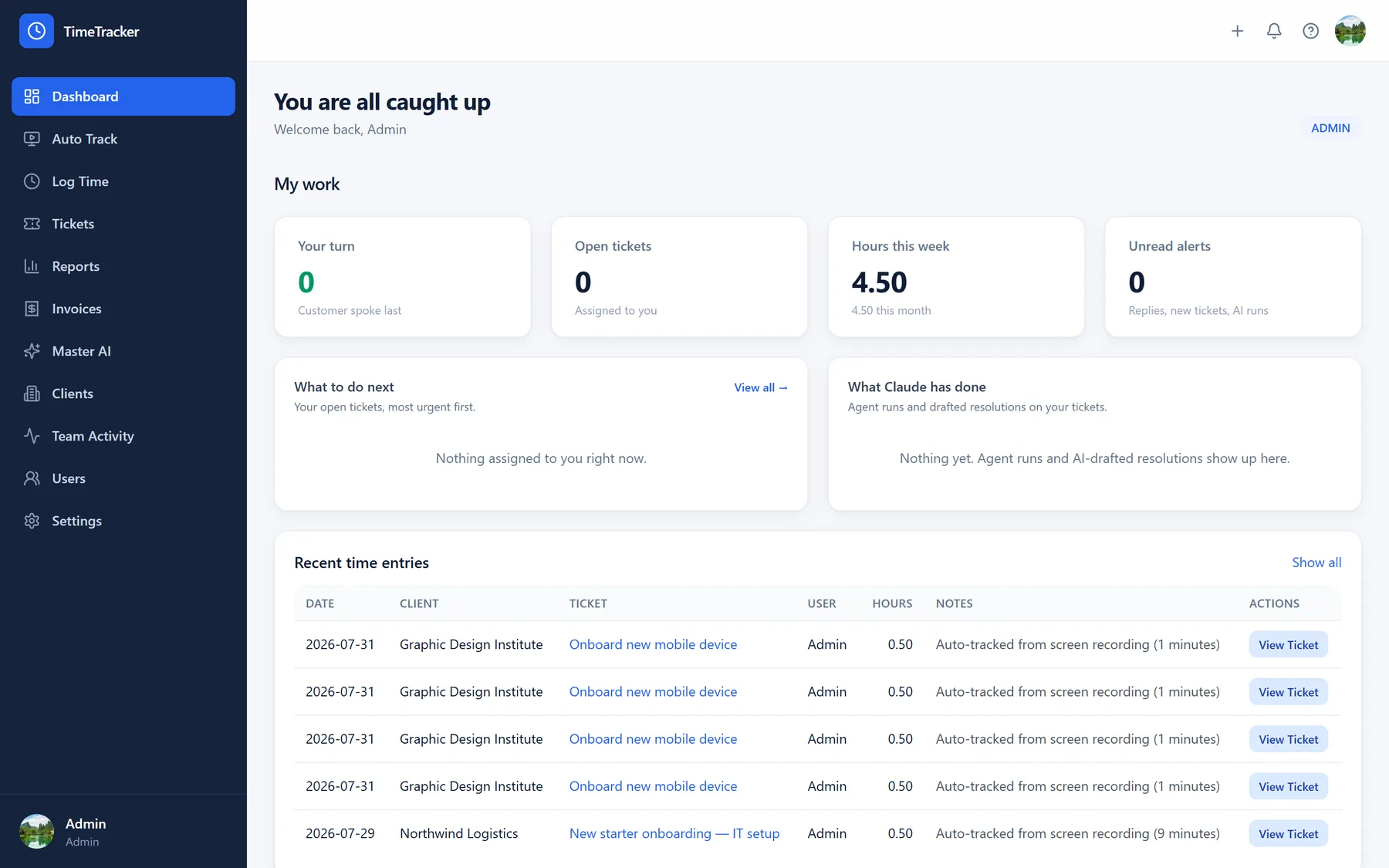
Twelve screens from the live product, in the order the work happens — from the queue an engineer opens in the morning to the invoice that leaves at month end.
01 / 12
Dashboard
Everyone opens to what they must act on
Separate views for engineers and for managers — not one dashboard bent to serve both.
Your turn: tickets where the customer replied last
Hours this week and month, against what was billed
What the AI did, on tickets you own
Unread alerts for replies, new tickets and agent runs
See it against your own tenant
A trial runs against one of your real clients, read-only, and shows you their actual posture in an afternoon. No slide deck version of the product.